# Welcome to mdMD: A Native Markdown Editor for macOS

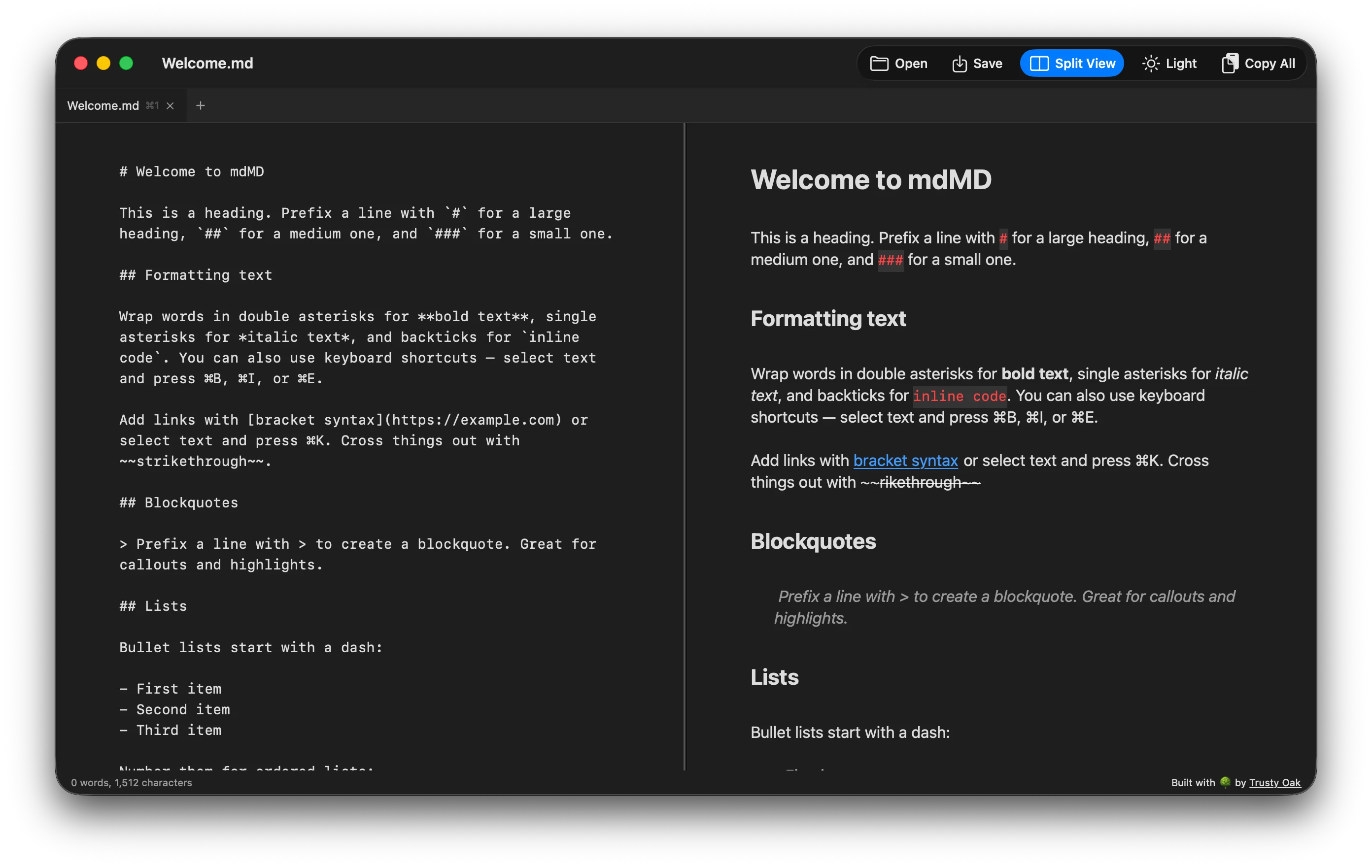
A **native**, lightweight markdown editor built with SwiftUI and AppKit that gets out of your way and lets you focus on writing.

## Features at a Glance

- [x] Real-time syntax highlighting for headers, bold, italic, code blocks, links, and more
- [x] Slash commands: type `/` at the start of any line to insert headings, lists, and code blocks
- [x] Multi-tab editing with keyboard shortcuts (⌘1 through ⌘9) to switch between documents
- [x] Interactive checkboxes: click to toggle task list items directly in the editor
- [x] Rich HTML copy: paste formatted markdown into Notion, Obsidian, Google Docs, and more with ⌘+Shift+C
- [ ] Your next great idea starts here

> "The best tools are the ones that disappear. You stop thinking about the editor and start thinking about the writing."

```swift
import SwiftUI

struct ContentView: View {
    @StateObject private var tabManager = TabManager()

    var body: some View {
        VStack(spacing: 0) {
            TabBarView(manager: tabManager)
            EditorView(document: tabManager.activeDocument)
        }
        .frame(minWidth: 700, minHeight: 500)
    }
}
```

### Keyboard Shortcuts: Everything at Your Fingertips

| Shortcut          | Action                                    |
|-------------------|-------------------------------------------|
| ⌘B               | Toggle **bold** on selected text          |
| ⌘I               | Toggle *italic* on selected text          |
| ⌘E               | Toggle `inline code` on selected text     |
| ⌘K               | Insert or edit a [hyperlink](url)         |
| ⌘N               | Open a new empty document tab             |
| ⌘W               | Close the current tab                     |
| ⌘+Shift+C        | Copy document as rich HTML for pasting    |

## Getting Started with mdMD

1. Download the latest `.dmg` from the official website
2. Open the disk image and drag **mdMD.app** into your Applications folder
3. Launch mdMD and start writing beautiful markdown immediately. No configuration needed

---

*Built with SwiftUI, AppKit, and the swift-markdown parser for full CommonMark compatibility.*

### Rich Copy: Paste Anywhere

Press `⌘+Shift+C` to copy your entire markdown document as rich HTML. Then paste directly into Notion, Obsidian, Google Docs, Confluence, or any rich-text editor. Headings, lists, code blocks, and checkboxes all come through with perfect formatting.

## Task Management with Interactive Checkboxes

- [x] Design and implement the syntax highlighting engine using MarkupVisitor pattern
- [x] Build the slash command menu as a floating NSPanel with fuzzy search
- [x] Add multi-tab support with Combine-powered state management via TabManager
- [x] Create the rich HTML exporter using a custom MarkupVisitor subclass
- [ ] Ship version 1.0 to the world

> Markdown is meant to be as easy-to-read and as easy-to-write as is feasible. A Markdown-formatted document should be
> publishable as-is, as plain text, without looking like it's been marked up with tags or formatting instructions.
>
> - John Gruber, creator of Markdown

```javascript
// Opening a file programmatically
const fs = require('fs');
const markdown = fs.readFileSync('./README.md', 'utf-8');
console.log('Loaded ' + markdown.split('\n').length + ' lines of markdown');
console.log('Ready to edit in mdMD...');
```

### Architecture Overview: How mdMD Works Under the Hood

The app bridges **SwiftUI** (window and tab chrome) with **AppKit** (text editing) via `NSViewRepresentable`. User input flows through `MarkdownTextView` → `EditorCoordinator` → `SyntaxHighlighter` which visits the AST and applies `NSAttributedString` attributes → `CheckboxLayoutManager` updates interactive overlays.

```python
# Example: Converting markdown to HTML (similar to what mdMD does internally)
import markdown
with open('document.md', 'r') as f:
    content = f.read()
html = markdown.markdown(content, extensions=['tables', 'fenced_code', 'task_lists'])
print(f"Converted {len(content)} chars of markdown to {len(html)} chars of HTML")
```

## Why Choose mdMD Over Other Editors?

**Native performance.** Built with SwiftUI and AppKit, not Electron. Zero startup time, instant response, low memory usage.
**Privacy first.** Your files stay on your Mac. No cloud sync, no telemetry, no accounts to create.
**Beautiful defaults.** Carefully crafted syntax highlighting with a curated color palette. Dark mode support built in.

### Supported File Formats and Compatibility

mdMD works with standard `.md` and `.markdown` files using the **swift-markdown** parser for full CommonMark specification compliance. This means your documents are portable and will render correctly in any CommonMark-compatible renderer, including Notion, Obsidian, GitHub, and more.

No config files. No setup wizards. No preferences to tweak. Just open mdMD and start writing.
# Welcome to mdMD: A Native Markdown Editor for macOS
A **native**, lightweight markdown editor built with SwiftUI and AppKit that gets out of your way and lets you focus on writing.
## Features at a Glance
- [x] Real-time syntax highlighting for headers, bold, italic, code blocks, links, and more
- [x] Slash commands: type `/` at the start of any line to insert headings, lists, and code blocks
- [x] Multi-tab editing with keyboard shortcuts (⌘1 through ⌘9) to switch between documents
- [x] Interactive checkboxes: click to toggle task list items directly in the editor
- [x] Rich HTML copy: paste formatted markdown into Notion, Obsidian, Google Docs, and more with ⌘+Shift+C
- [ ] Your next great idea starts here
> "The best tools are the ones that disappear. You stop thinking about the editor and start thinking about the writing."
```swift
import SwiftUI
struct ContentView: View {
@StateObject private var tabManager = TabManager()
var body: some View {
VStack(spacing: 0) {
TabBarView(manager: tabManager)
EditorView(document: tabManager.activeDocument)
}
.frame(minWidth: 700, minHeight: 500)
}
}
```
### Keyboard Shortcuts: Everything at Your Fingertips
| Shortcut | Action |
|-------------------|-------------------------------------------|
| ⌘B | Toggle **bold** on selected text |
| ⌘I | Toggle *italic* on selected text |
| ⌘E | Toggle `inline code` on selected text |
| ⌘K | Insert or edit a [hyperlink](url) |
| ⌘N | Open a new empty document tab |
| ⌘W | Close the current tab |
| ⌘+Shift+C | Copy document as rich HTML for pasting |
## Getting Started with mdMD
1. Download the latest `.dmg` from the official website
2. Open the disk image and drag **mdMD.app** into your Applications folder
3. Launch mdMD and start writing beautiful markdown immediately. No configuration needed
---
*Built with SwiftUI, AppKit, and the swift-markdown parser for full CommonMark compatibility.*
### Rich Copy: Paste Anywhere
Press `⌘+Shift+C` to copy your entire markdown document as rich HTML. Then paste directly into Notion, Obsidian, Google Docs, Confluence, or any rich-text editor. Headings, lists, code blocks, and checkboxes all come through with perfect formatting.
## Task Management with Interactive Checkboxes
- [x] Design and implement the syntax highlighting engine using MarkupVisitor pattern
- [x] Build the slash command menu as a floating NSPanel with fuzzy search
- [x] Add multi-tab support with Combine-powered state management via TabManager
- [x] Create the rich HTML exporter using a custom MarkupVisitor subclass
- [ ] Ship version 1.0 to the world
> Markdown is meant to be as easy-to-read and as easy-to-write as is feasible. A Markdown-formatted document should be
> publishable as-is, as plain text, without looking like it's been marked up with tags or formatting instructions.
>
> - John Gruber, creator of Markdown
```javascript
// Opening a file programmatically
const fs = require('fs');
const markdown = fs.readFileSync('./README.md', 'utf-8');
console.log('Loaded ' + markdown.split('\n').length + ' lines of markdown');
console.log('Ready to edit in mdMD...');
```
### Architecture Overview: How mdMD Works Under the Hood
The app bridges **SwiftUI** (window and tab chrome) with **AppKit** (text editing) via `NSViewRepresentable`. User input flows through `MarkdownTextView` → `EditorCoordinator` → `SyntaxHighlighter` which visits the AST and applies `NSAttributedString` attributes → `CheckboxLayoutManager` updates interactive overlays.
```python
# Example: Converting markdown to HTML (similar to what mdMD does internally)
import markdown
with open('document.md', 'r') as f:
content = f.read()
html = markdown.markdown(content, extensions=['tables', 'fenced_code', 'task_lists'])
print(f"Converted {len(content)} chars of markdown to {len(html)} chars of HTML")
```
## Why Choose mdMD Over Other Editors?
**Native performance.** Built with SwiftUI and AppKit, not Electron. Zero startup time, instant response, low memory usage.
**Privacy first.** Your files stay on your Mac. No cloud sync, no telemetry, no accounts to create.
**Beautiful defaults.** Carefully crafted syntax highlighting with a curated color palette. Dark mode support built in.
### Supported File Formats and Compatibility
mdMD works with standard `.md` and `.markdown` files using the **swift-markdown** parser for full CommonMark specification compliance. This means your documents are portable and will render correctly in any CommonMark-compatible renderer, including Notion, Obsidian, GitHub, and more.
No config files. No setup wizards. No preferences to tweak. Just open mdMD and start writing.